🌐 Network Diagram
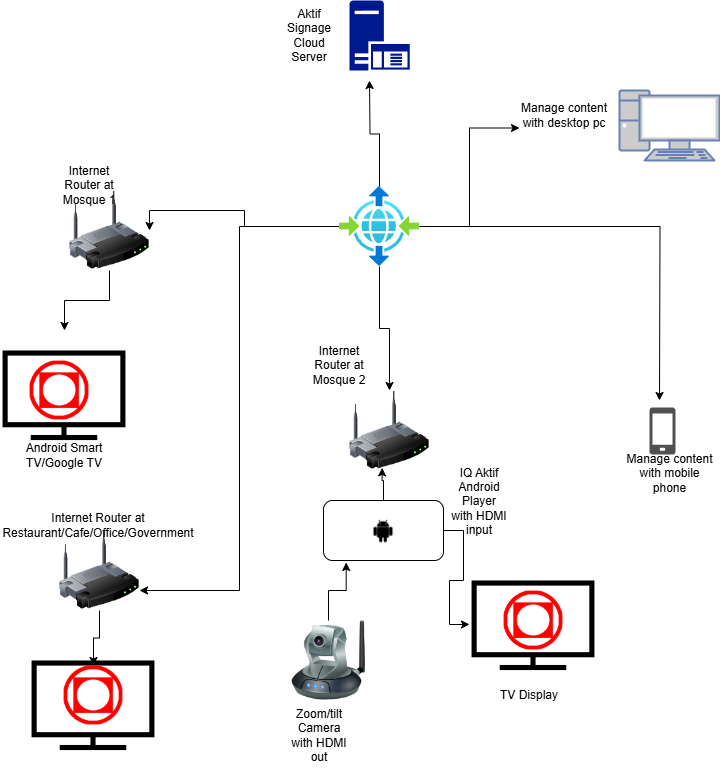
This diagram shows how Aktif Signage TV connects and communicates across your network infrastructure.
⚙️ How It Works
☁️ Cloud Server
All content is managed through our secure cloud-based portal. Update your displays from anywhere in the world.
🌐 Internet Connection
Your Android Box connects to the internet via WiFi or Ethernet to receive real-time content updates.
📦 Android Box
The Aktif Signage TV Android Box processes and displays content on your TV or monitor via HDMI.
📺 Display Output
Connect to any TV or monitor with HDMI input. Support for multiple displays from a single management portal.
📋 Network Requirements
Internet Speed
Minimum 5 Mbps recommended for smooth video playback and real-time updates.
Connection Type
WiFi or Ethernet (LAN) connection supported. Ethernet recommended for stable performance.
Firewall
Ensure outbound HTTPS (port 443) is allowed for cloud communication.
Router
Standard home or business router with DHCP enabled for automatic IP assignment.
📞 Need Help with Setup?
Need assistance with network configuration or setup? Our team is here to help!
WhatsApp Support +60 12-518 7849📲 Get Started with Aktif Signage TV Today!
🚀 Transform any screen into a powerful digital signage display in minutes!